
Glossary#
This page collects common FMOD and audio terms used with Godot-FmodPlayer. It refers to the FMOD API Glossary and adapts the explanations to Godot Engine, the FMOD Core API, and Godot-FmodPlayer usage.
Important
This page is not an official Chinese translation of the FMOD documentation and does not replace the official FMOD license, API documentation, or technical support. Names such as FMOD and FMOD Engine belong to Firelight Technologies Pty Ltd. When publishing a project, always follow FMOD Legal Information and the official licensing terms.
2D and 3D#
2D sounds do not participate in spatial positioning. They are usually suitable for UI sound effects, background music, narration, menu sounds, and other sounds that do not need to follow scene positions. In Godot-FmodPlayer, FmodAudioStreamPlayer is closer to the default 2D playback workflow.
3D sounds calculate volume, pan, distance attenuation, occlusion, and Doppler effects from the relationship between the sound source and the listener. In Godot-FmodPlayer, FmodAudioStreamPlayer3D synchronizes the Godot node global position to the FMOD channel.
Note
FmodChannelControl.set_3d_level() adjusts the 3D blend amount. This is useful when a sound should keep some spatial feeling while retaining a stable pan image.
Audio Asset#
An audio asset is playable sound data in the project. It may be an independent audio file such as wav, ogg, mp3, or flac, or another runtime-readable format supported by FMOD.
In Godot-FmodPlayer, the common workflow is to import audio files as FmodAudioStream and play them through FmodAudioStreamPlayer, FmodAudioStreamPlayer2D, or FmodAudioStreamPlayer3D.
Audio Channel#
Audio channel can mean two different things, so the distinction matters:
Speaker channel: A speaker channel in the audio signal, such as mono, left, right, or multiple output channels in 5.1 surround.
FMOD Channel: One sound playback instance in FMOD, corresponding to FmodChannel in Godot-FmodPlayer.
For example, a stereo sound effect file has two speaker channels. When it is played once, FMOD creates or assigns one Channel for that playback. If the same sound plays three times at once, it may correspond to three different FmodChannel objects.
Bus#
A Bus is an audio bus used to collect a group of sounds into the same mixing route. Common buses include Music, SFX, Voice, and Ambient.
Godot-FmodPlayer synchronizes Godot’s AudioServer bus structure into FmodAudioBusLayout and uses FmodAudioBus / FmodChannelGroup to control FMOD-side mixing.
Channel#
A Channel is one sound instance currently playing in FMOD, or managed by the virtual voice system. It can control volume, pause, pitch, loop points, playback position, 3D properties, DSP chains, and callbacks.
In Godot-FmodPlayer, playback nodes maintain a FmodChannel internally. If finer control is needed, get the current playback channel and call FmodChannelControl or FmodChannel methods.
ChannelGroup#
A ChannelGroup is a mixing container for multiple Channels or child ChannelGroups. It is useful for grouped control, such as lowering all music, pausing a group of ambience sounds, or adding a filter to the whole SFX bus.
In Godot-FmodPlayer, FmodChannelGroup is usually created and managed by the bus system. For regular projects, prefer the bus APIs described in Mixing System; access ChannelGroup directly only when lower-level control is needed.
ChannelControl#
ChannelControl is the shared control surface of Channel and ChannelGroup. It includes APIs for volume, mute, pause, pitch, 3D properties, pan matrix, DSP insertion, fade points, and callbacks.
Both FmodChannel and FmodChannelGroup in Godot-FmodPlayer inherit from FmodChannelControl, so many playback and mixing controls are shared.
DSP#
DSP stands for Digital Signal Processing. Reverb, equalizers, filters, delay, distortion, compressors, and spectrum analyzers can all participate in audio processing as DSP units.
In Godot-FmodPlayer, FmodDSP can be added to a Channel, ChannelGroup, or bus-related mixing route. If multiple sounds need the same effect, placing the DSP on the corresponding bus is usually easier to maintain and cheaper than creating the effect for every sound.
DSP Chain#
A DSP chain is a processing path formed by connecting multiple DSPs in order. Once sound enters the chain, it passes through each processing unit sequentially. Different orders produce different results; distortion before reverb usually sounds different from reverb before distortion.

In Godot-FmodPlayer, you can control the chain with FmodChannelControl.add_dsp(), FmodChannelControl.remove_dsp(), and FmodChannelControl.set_dsp_index().
DSP Clock#
DSP Clock is FMOD mixer time counted at sample precision. It is commonly used for precise playback scheduling, delayed starts, fades, or aligning sounds.
In Godot-FmodPlayer, APIs such as FmodChannelControl.get_dsp_clock() and FmodChannelControl.set_delay() expose related timing controls.
Listener#
A Listener represents where the player hears the world from, including position and orientation. 3D sounds are calculated from the distance, direction, and relative velocity between the listener and the source.
In a Godot scene, the listener usually follows the player, main camera, or active AudioListener3D. When using FmodAudioStreamPlayer3D, make sure the FMOD system receives the correct listener transform; otherwise 3D sound direction or distance may be wrong.
Sound#
Sound is FMOD’s runtime representation of audio data. It is usually created from a file, memory data, or streaming data, and then played by the System as a Channel.
In Godot-FmodPlayer, FmodAudioStream creates the underlying FmodSound only when needed. This lets the resource exist as a Godot resource first, and only hand the sound to FMOD when playback or low-level access is required.
Stream and Sample#
Stream means audio is read and decoded while playing, which is suitable for large audio such as music, long narration, and long ambience. Sample means the audio data is loaded into memory before playback, which is suitable for short sound effects, frequently triggered UI sounds, and low-latency responses.
In Godot-FmodPlayer, you choose the more suitable loading method through the creation mode of FmodAudioStream. In general, prefer streaming for long audio and sample loading for short sound effects.
Virtual Channel#
A Virtual Channel is a channel in FMOD’s virtual voice system. When many sounds play at the same time, FMOD may virtualize inaudible or low-priority sounds. A virtual channel keeps playback time and state, but may not consume full mixing resources.
In Godot-FmodPlayer, FmodChannel.is_virtual() can query whether a channel is virtual. This is useful when debugging large ambience sets, particle sounds, or sound budgets in open-world scenes.
Rolloff#
Rolloff is the curve describing how a 3D sound attenuates as distance increases. Different curves change how the sound feels from near to far.
In Godot-FmodPlayer, 3D playback nodes and FmodChannelControl provide settings such as minimum distance, maximum distance, and custom attenuation curves. For spatial audio, start by tuning min_distance and max_distance.
Doppler#
Doppler is the pitch shift caused by relative velocity between a sound source and the listener. Fast passing vehicles, projectiles, or moving objects can use it to enhance the sense of speed.
In Godot-FmodPlayer, FmodAudioStreamPlayer3D synchronizes position and velocity information. If the effect is too strong or does not fit the game style, reduce the Doppler-related settings.
Occlusion#
Occlusion describes how walls, terrain, or other geometry block sound propagation, reducing volume and high-frequency content.
Godot-FmodPlayer provides FmodGeometryInstance3D to register scene geometry with FMOD Geometry. It is suitable for projects that need sounds behind doors, sounds behind walls, or room isolation effects.
Pan and Mix Matrix#
Pan usually controls where a sound sits in the left/right channels or surround field. Mix Matrix is a lower-level input-to-output channel matrix that can precisely control how each input channel is distributed to output channels.
In Godot-FmodPlayer, simple left/right panning can use FmodChannelControl.set_pan(). For multi-channel or special routing, use FmodChannelControl.set_mix_matrix().
Mix Matrix#
Mix Matrix controls how input channels are distributed to output channels. You can think of it as a weight table: each column is an input channel, each row is an output channel, and each value says how much of that input channel is sent to that output channel.
For example, a stereo input sent unchanged to stereo output:
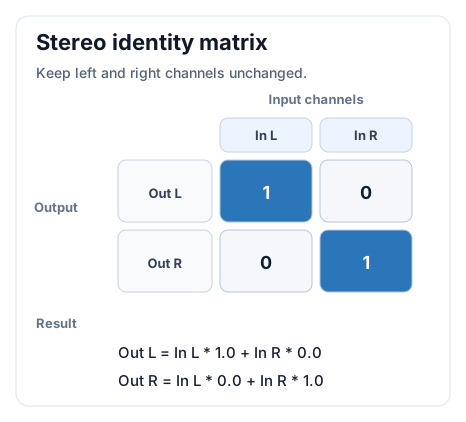
This matrix means the left channel goes only to the left speaker, and the right channel goes only to the right speaker. Written more directly:
Output L = Input L * 1.0 + Input R * 0.0
Output R = Input L * 0.0 + Input R * 1.0
In Godot-FmodPlayer, FmodChannelControl.set_mix_matrix() accepts a PackedFloat32Array and specifies the output channel count, input channel count, and input channel stride.
The example below swaps the left and right channels of a stereo sound:
func swap_stereo(channel: FmodChannel) -> void:
    var matrix := PackedFloat32Array([
        0.0, 1.0, # Out L = In R
        1.0, 0.0, # Out R = In L
    ])

    channel.set_mix_matrix(matrix, 2, 2)
If you only want to adjust the left/right position of one playback instance, prefer FmodChannelControl.set_pan(). Mix Matrix is better for multi-channel format conversion, special channel routing, left/right swapping, mono biasing, and debugging audio assets.
Upmix#
Upmix means distributing fewer input channels to more output channels. For example, sending a mono sound effect to stereo output, or sending stereo music to 5.1 output.
The most common mono-to-stereo upmix sends the same mono signal to both left and right channels, which sounds centered. If you want the mono sound to lean left, reduce the right channel level:
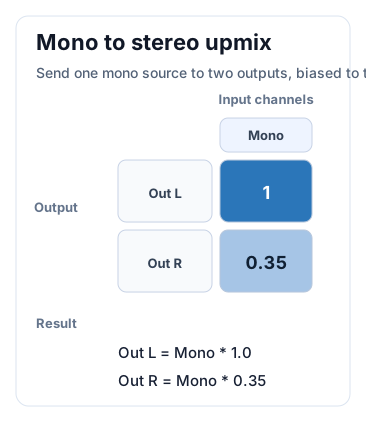
The corresponding code can be written as:
func mono_to_left_biased_stereo(channel: FmodChannel) -> void:
    var matrix := PackedFloat32Array([
        1.0,  # Out L = Mono * 1.0
        0.35, # Out R = Mono * 0.35
    ])

    channel.set_mix_matrix(matrix, 2, 1)
In Godot-FmodPlayer, simple left/right panning is usually easier with FmodChannelControl.set_pan(). Manually set the mix matrix only when precise multi-channel distribution is needed.
Downmix#
Downmix means folding more input channels into fewer output channels. For example, converting stereo to mono, or outputting 5.1 content to a stereo device.
A common stereo-to-mono downmix matrix is:
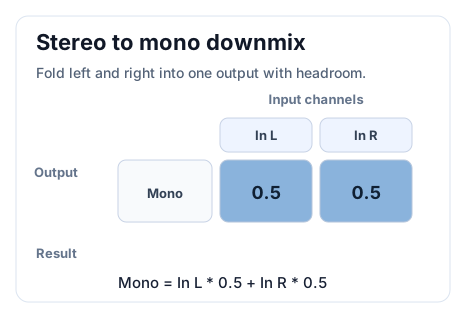
This means the left and right channels are each added at half level:
Output Mono = Input L * 0.5 + Input R * 0.5
Do not simply use 1.0 + 1.0 for downmixing. Adding two full-level signals directly can exceed the normal range, causing clipping or a sudden loudness increase. In real projects, start with 0.5, 0.707, or a more conservative value, then adjust based on material loudness and the target platform.
Code example:
func stereo_to_mono(channel: FmodChannel) -> void:
    var matrix := PackedFloat32Array([
        0.5, 0.5, # Out Mono = In L * 0.5 + In R * 0.5
    ])

    channel.set_mix_matrix(matrix, 1, 2)
Simplified 5.1-to-stereo example#
5.1 channels can usually be understood in this order:
Front Left, Front Right, Center, LFE, Surround Left, Surround Right
A simplified 5.1-to-stereo downmix matrix can be written as:
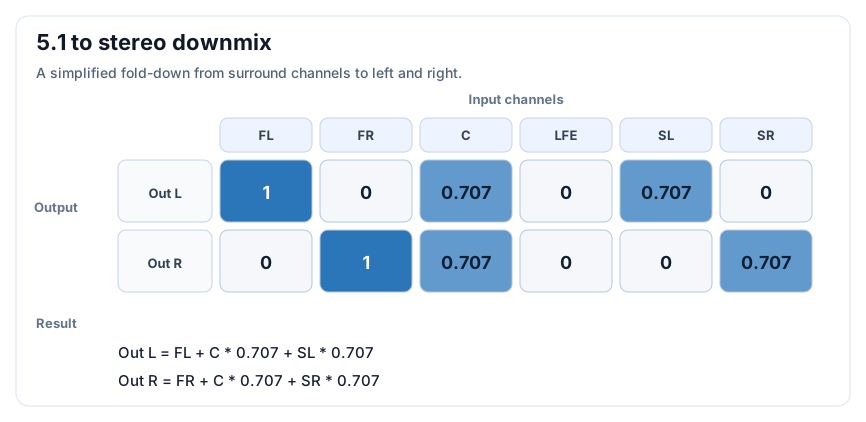
The idea is:
Front left and front right go to the corresponding left and right outputs.
The center channel goes to both left and right output, reduced to
0.707to avoid making centered content too loud.Surround left goes to left output, and surround right goes to right output, also reduced appropriately.
LFE is the low-frequency effects channel and may not be suitable for direct mixing into regular stereo output; whether to include it depends on the project.
Warning
There is no single correct answer for multi-channel downmixing. Different platforms, devices, virtual surround headphones, cinema standards, and game styles may require different matrices. For critical content, always listen on the actual target device.
Callback#
Callback means FMOD notifies user code when a specific event occurs, such as a sound ending, a channel state change, or a lower-level system event.
In Godot-FmodPlayer, ChannelControl-level callbacks are forwarded to Godot through the callback_received signal. Each System, ChannelControl, or DSP usually maintains one callback entry, so callback registration should branch by callback type.
System#
System is the core object of the FMOD Core API. It initializes audio devices, creates Sounds, plays sounds, manages Channels, updates the mixing system, retrieves performance data, and handles recording.
In Godot-FmodPlayer, you usually do not create System manually. The plugin initializes and maintains the main system through FmodServer. Advanced usage can start from FmodServer.get_main_system() and FmodSystem.
Bank and Event#
Bank and Event are common in the FMOD Studio workflow. Godot-FmodPlayer mainly targets the FMOD Core API, focusing on audio file playback, channel control, DSP effects, mixing buses, 3D audio, and performance monitoring.
Therefore, when Bank or Event appears in this plugin documentation, it is usually only to help explain related FMOD ecosystem concepts. If a project needs a full FMOD Studio Event workflow, Bank builds, parameter automation, and audio-designer tooling, choose a dedicated FMOD Studio integration instead of treating Godot-FmodPlayer as one.
FSB#
FSB stands for FMOD Sample Bank. It is a format for packed sample data and is not the same concept as a Bank in the Studio workflow.
For regular audio files and FMOD Core API usage, Godot-FmodPlayer usually does not require direct FSB handling. If your project depends on a special packaged format, first confirm support for the target platform, FMOD Engine version, and plugin import flow.
Profiler#
A Profiler is a tool for observing the runtime state of the audio system. It helps locate CPU usage, streaming reads, channel count, DSP cost, and mixing issues.
Godot-FmodPlayer registers some FMOD performance data in Godot’s performance monitors, such as FmodCPUUsage/DSP, FmodCPUUsage/Stream, and FmodFileUsage/StreamBytesRead. When debugging stutters, pops, or loading issues, check these monitors first.
Runtime Library#
A runtime library is the FMOD Engine binary for the target platform, such as fmod.dll on Windows or libfmod.so and related Java files on Android.
Godot-FmodPlayer does not distribute FMOD runtime libraries. Get them from official FMOD channels for your target platform and place them in the project as described in Export Guide or Installation Guide. When publishing a game, you must also follow FMOD licensing and attribution requirements.